



FlowQ Resources

Installing FlowQ Connect using Terminal (Headless Linux Setup)
Install FlowQ Connect on a Raspberry Pi or Linux device using the terminal. This guide shows how to set up...

Connecting Printers with FlowQ Connect
Connect 3D Printers to FlowQ using just your computer, no hardware required. This guide shows how to install FlowQ Connect,...

FlowQ + Farmloop for Fully Automated 3D Printer Fleets
Step-by-step guide to automating a 3D print farm. Use FarmLoop for part ejection and FlowQ to manage print queues and...

Creating a Print Queue in FlowQ
How the FlowQ print queue works, including how jobs are routed to printers, how to add files to the queue,...

Adding a 3D Printer to FlowQ
How to add a 3D printer to FlowQ and prepare it for cloud-based automation. It walks through selecting your printer...

Connecting an S1 Plus to FlowQ
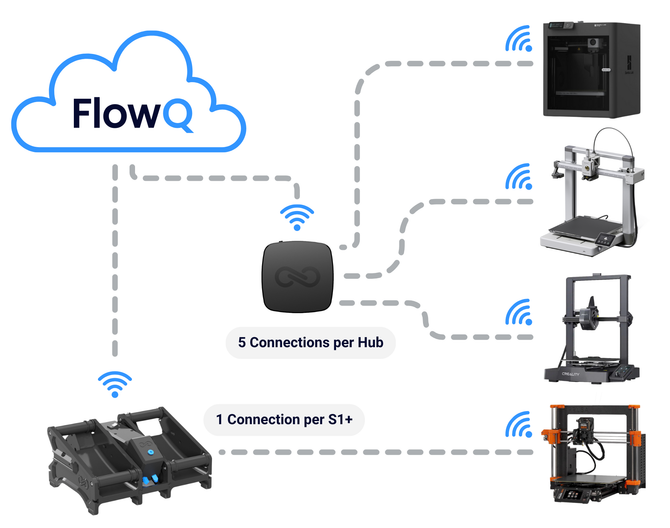
How to connect the S1 Plus to FlowQ for secure printer tunneling and automated 3D printing workflows. It explains how...

Connecting a Hub to FlowQ
This guide explains how to set up and provision a FlowQ Hub, a device that securely connects up to five...

Bambu P1S & P1P Connection Guide - FlowQ
Before you can link your Bambu P1P or P1S to FlowQ, you’ll need to enable Developer Mode. In this guide,...

Bambu A1 & A1-mini Connection Guide - FlowQ
Before you can link your Bambu A1 or A1 Mini to FlowQ, you’ll need to enable Developer Mode. In this...
